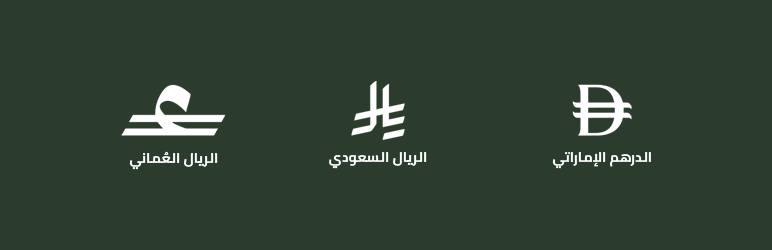
I just released version 2.0 of the Saudi Riyal for WooCommerce plugin, and it’s no longer just about the Saudi Riyal.
The plugin now supports three Gulf currency symbols: Saudi Riyal (SAR), UAE Dirham (AED), and Omani Rial (OMR). So I renamed it from “Saudi Riyal Symbol for WooCommerce” to “Gulf currencies Symbols for WooCommerce.”
Why I Built This
WooCommerce doesn’t render the official Saudi Riyal symbol correctly. Same issue with the UAE Dirham and Omani Rial symbols. You end up with “SAR” or “AED” text instead of the actual symbol.
This isn’t just about aesthetics. Saudi Arabia mandated the use of the new Riyal symbol for all businesses. The UAE and Oman have similar requirements for their currency symbols. If you’re running a WooCommerce store in these countries, you need to display the official symbol to stay compliant.
The plugin fixes this automatically. No custom code, no messing with WooCommerce templates.
What v2.0 Adds
- UAE Dirham (AED) symbol support.
- Omani Rial (OMR) symbol support.
- Better symbol rendering in the WordPress admin dashboard
Everything else from v1.x still works: frontend display, WooCommerce emails, PDF invoices, RTL support, and block-based Cart/Checkout compatibility.
Compatibility
I made sure this works with the tools people actually use:
- WooCommerce emails
- PDF Invoices & Packing Slips for WooCommerce
- Challan – PDF Invoice & Packing Slip for WooCommerce
- WOOCS – WooCommerce Currency Switcher
- Multi Currency for WooCommerce (VillaTheme)
- WooCommerce Multi-Currency
If you’re using a currency switcher and selling in multiple Gulf currencies, the symbols will display correctly for each one.
Install It
The plugin is free and available on the WordPress plugin directory:
Download Gulf currencies Symbols for WooCommerce
Just install, activate, and the symbols work automatically. No configuration needed.
Thanks!