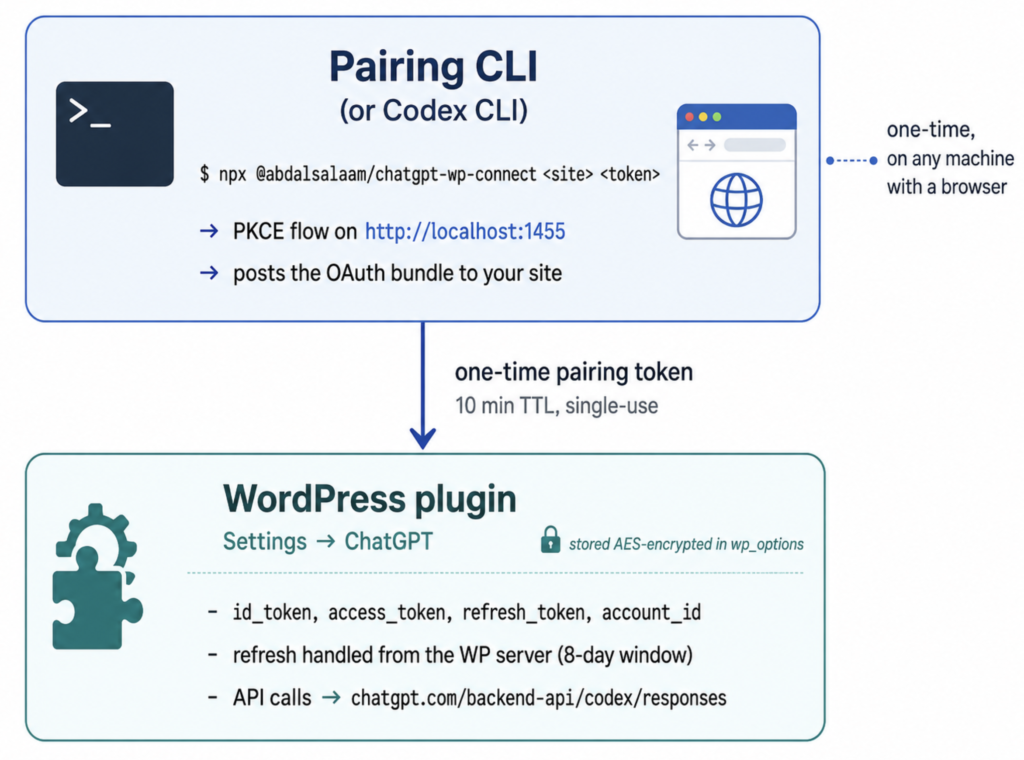
AI Provider for ChatGPT is now available in the WordPress.org plugin directory. It lets WordPress 7.0’s AI Client use an existing ChatGPT Free, Plus, or Pro account instead of a separate OpenAI API key, supporting text generation, chat history, tool use, JSON output, and model discovery.
The update includes review-related fixes, documented external endpoints, namespaced plugin data, improved cleanup on uninstall, and a resolved stream error. The post also explains installation, connection through a pairing CLI, and limitations such as no Business or Enterprise support, no image generation, and reliance on OpenAI’s Codex CLI OAuth flow.
A few weeks ago I wrote about a plugin I built to plug WordPress 7.0’s AI features into a ChatGPT subscription instead of a billed API key. Back then it lived on GitHub and you had to install it by hand.
That changed. The plugin passed the WordPress.org review and is now live on the official plugin directory:
AI Provider for ChatGPT on WordPress.org
If you read the original write-up, this is the short version of what happened since, and how to get it now.
What the plugin does
WordPress 7.0 ships a built-in AI Client, and providers register against it. Every provider plugin I could find wanted an OpenAI API key, and that key is billed separately from your ChatGPT subscription. So if you already pay for ChatGPT Plus or Pro, you end up paying a second time to use AI inside WordPress.
AI Provider for ChatGPT connects your existing ChatGPT account instead. No API key. Requests are routed through the same backend the Codex CLI uses, so usage runs against the plan you already have.
Once it is connected, any plugin or theme that uses the WordPress AI Client can call ChatGPT the same way it calls Google or Anthropic: text generation with GPT-4o, GPT-4.1 and the o-series, multi-turn chat history, function calling and tool use, structured JSON output, and automatic model discovery.
What is new since the GitHub-only version
Getting through the WordPress.org review meant tightening a few things up. The notable changes:
- All plugin-owned options, transients, and hooks are now prefixed so they cannot collide with anything else in WordPress’s shared namespaces.
- Every external service the plugin contacts is documented in the readme, with the exact endpoints and what data is sent to each.
- The configured state of the connector is read through the AI Client API rather than poking at the core option directly.
- A “Missing the output key” error from the Codex responses stream was fixed.
- Uninstall now cleans up the options and transients the plugin created.
The security model is the same one described in the first post. The OAuth bundle is encrypted at rest with sodium_crypto_secretbox, keyed off your wp-config.php salts. The pairing endpoint uses a single-use token with a ten-minute lifetime, hashed before storage, with a per-IP rate limit.
How to install it now
You no longer need to clone anything. From your WordPress admin:
- Go to Plugins, Add New and search for “AI Provider for ChatGPT”.
- Install and activate it.
- Open Settings, ChatGPT and click Connect with ChatGPT.
- The screen shows a one-line command. Run it on any machine with a browser:
npx @abdalsalaam/chatgpt-wp-connect https://your-site.example <pairing-token> - Sign in to OpenAI in the window that opens. The WordPress tab connects itself. No copying secrets, no pasting tokens.
After that the provider appears in the WordPress AI picker, and the models your account can reach show up automatically.
If you already use the Codex CLI, the same screen has an Advanced option to paste or upload your existing ~/.codex/auth.json instead.
The trade-offs still apply
I said this in the first post and it is still true, so it stays here:
- The OAuth consent screen says “Codex CLI” because that is the OpenAI-owned client whose ID the flow reuses. If OpenAI rotates or revokes it, the plugin breaks the same day.
- This is the consumer ChatGPT backend, so there is no API data processing agreement. Prompts may be used for training unless your account has training turned off.
- Only the Free, Plus, and Pro tiers work. Business, Edu, and Enterprise do not.
- Image generation is not supported on this backend. For DALL-E or gpt-image, use the standard OpenAI provider with an API key.
None of that is hidden. It is the honest cost of getting WordPress AI to run on a subscription you already pay for.
Try it
The plugin is free and open source under GPL.
- WordPress.org listing: wordpress.org/plugins/ai-provider-for-chatgpt
- Plugin source: github.com/Abdalsalaam/ai-provider-for-chatgpt
- Pairing CLI source: github.com/Abdalsalaam/chatgpt-wp-connect
If you install it, I would really like to hear how it goes, bug reports especially. Open an issue on GitHub or leave a review on the directory.